
Alert v.s. Monitoring

Regarding Alert and Monitoring, in fact it has quite different meaning between them literally. Alert is a warning or alarm of something wrong or suspicious what you want to be aware. Monitoring is to watch closely for specific purposes.
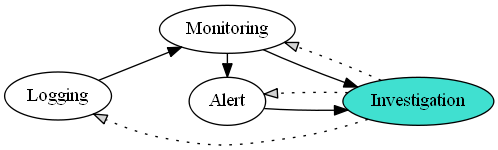
security_activity

Security Activity Relationship

digraph {
  rankdir=LR
  L [label="Logging"]
  M [label="Monitoring"]
  A [label="Alert"]
  I [label="Investigation" style=filled fillcolor=turquoise]
    L -> M
    M -> A
    M -> I
    A -> I
    I -> L [style=dotted fillcolor=lightgray]
    I -> A [style=dotted fillcolor=lightgray]
    I -> M [style=dotted fillcolor=lightgray]
  {rank=same A M}
}

However it is not difficult to see mixing those signification between them in terms of computer security. For instance, someone made an alert which was issued by email for just looking login history. It’s not bad, but we most likely ignore this kind of email if there are too much them in your inbox. It’s a problem.

In my opinion, Alert has an threshold and Monitoring has an ability to aware of out-of-data by using visibility.

In terms of security, alert is occurred when over a specific threshold. For example, if login requests in a IP address over 100 in a second, an alert will be happened to notice there were suspicious logins. It might be an login brute force attack. With this alert, we are going to investigate if it is an attack or not. In this respect, we need to know variant attacks in order to decide the exact threshold.

On the other hands, monitoring is looking at suspicious one like out-of-data. For example, we usually adopt binary-entropy in order to come up with out-of-data among lots of normal PE(Portable Executable)

Splunk Visual Basic Script

I made a script by using VB script as below. This script is forcing to show how to get the Splunk Parameters. Once you try to get the parameter by using “Wscript.Arguments”, you get wrong value because it separate the parameters based on space or tab. Here is a list of the Splunk parameters

  • SPLUNK_ARG_0 Script name
  • SPLUNK_ARG_1 Number of events returned
  • SPLUNK_ARG_2 Search terms
  • SPLUNK_ARG_3 Fully qualified query string
  • SPLUNK_ARG_4 Name of saved search
  • SPLUNK_ARG_5 Trigger reason (for example, “The number of events was greater than 1”)
  • SPLUNK_ARG_6 Browser URL to view the saved search
  • SPLUNK_ARG_8 File in which the results for this search are stored (contains raw results)

Ref) http://docs.splunk.com/Documentation/Splunk/5.0.2/alert/ConfiguringScriptedAlerts

On Error Resume Next
Err.Clear

Function GetNow()
t = Timer
temp = Int(t)
Miliseconds = Int((t-temp) * 1000)
Seconds = temp mod 60
temp = Int(temp/60)
Minutes = temp mod 60
Hours = Int(temp/60)
strTime = String(2 – Len(Hours), "0") & Hours & ":"
strTime = strTime & String(2 – Len(Minutes), "0") & Minutes & ":"
strTime = strTime & String(2 – Len(Seconds), "0") & Seconds & "."
strTime = strTime & String(4 – Len(Miliseconds), "0") & Miliseconds
GetNow = FormatDateTime(Date, 2) &" "& strTime
End Function

Const ForReading = 1, ForWriting = 2, ForAppending = 8
Dim objFSO, objLog
Set objFSO = CreateObject("Scripting.FileSystemObject")
Set objLog = objFSO.OpenTextFile("D:\log\splunk_script" & GetNow() & ".log", ForAppending, True)

<span style="color: #ff0000;"><em>Set oShell = CreateObject( "WScript.Shell" ) </em></span>
<span style="color: #ff0000;"><em>user = oShell.ExpandEnvironmentStrings("%UserName%") </em></span>
<span style="color: #ff0000;"><em>arg4 = oShell.ExpandEnvironmentStrings("%SPLUNK_ARG_4%") </em></span>
<span style="color: #ff0000;"><em>arg6 = oShell.ExpandEnvironmentStrings("%SPLUNK_ARG_6%")</em></span>

if Wscript.Arguments.Count > 5 then
Dim objSell
Dim strContent

strContent = "["&arg4&"] "& arg6

Set objShell = Wscript.CreateObject("WScript.Shell")
objShell.Run """C:\Program Files\Splunk\bin\scripts\sms.vbs"" """ & strContent & """"
Set objShell = Nothing
end if

if Err.Number <> 0 then
‘ An exception occurred
objLog.WriteLine "Exception:" & vbCrLf &_
" Error number: " & Err.Number & vbCrLf &_
" Error description: ‘" & Err.Description & "’" & vbCrLf
end if

objLog.Close
Set objLog = Nothing
Set objFSO = Nothing