Elasticsearch Curator

To secure HDD space somehow, Curator can help you. The installation of Curator on Ubuntu is very simple. Because, however, the configuration way was changed, this post is helpful for you.

Elasticsearch Curator Installation

# sudo apt-get -y install python-pip
# sudo pip install elasticsearch-curator


Make a schedule on Crontab

As I mentioned early, if you used Curator over 4.0 version, you should configure as below. It’s not mandatory of the configuration path, “/etc/curator/”.

30 0 * * * /usr/local/bin/curator --config=/etc/curator/curator.yml /etc/curator/del_elastic_indices.yml

# cat /etc/curator/curator.yml

client:
  hosts:
    - 127.0.0.1
  port: 9200
  use_ssl: False
  ssl_no_validate: False
  timeout: 30
  master_only: False

logging:
  loglevel: INFO
  logfile: /var/log/curator.log
  logformat: default

# cat /etc/curator/del_elastic_indices.yml

actions:
  1:
    action: delete_indices
    description: "Delete selected indices"
    options:
      ignore_empty_list: True
      timeout_override:
      continue_if_exception: False
      disable_action: False
    filters:
    - filtertype: pattern
      kind: prefix
      value: filebeat-
      exclude:
    - filtertype: age
      source: name
      direction: older
      timestring: '%Y.%m.%d'
      unit: days
      unit_count: 7
      exclude:

To check the result of the curator execution just before, you can ask Elasticseach by following RESTFull URL.

# curl -XGET 'http://localhost:9200/_cat/indices/*' -s
yellow open filebeat-2016.07.13 5 1 32 0 472.4kb 472.4kb
yellow open filebeat-2016.07.12 5 1 4 0 90.5kb 90.5kb
yellow open filebeat-2016.07.15 5 1 2980542 0 2.6gb 2.6gb
yellow open filebeat-2016.07.14 5 1 2604353 0 2.1gb 2.1gb
yellow open .kibana 1 1 103 0 89.3kb 89.3kb
yellow open filebeat-2016.07.11 5 1 3 0 54.1kb 54.1kb

Additionally, you can also check the log of the execution into a log file we specified in a curator configuration file, curator.yml.

# tail -n 5 /var/log/curator.log
2016-07-15 14:56:59,285 INFO Deleting selected indices
2016-07-15 14:56:59,285 INFO ---deleting index filebeat-2016.07.08
2016-07-15 14:56:59,285 INFO ---deleting index filebeat-2016.07.07
2016-07-15 14:56:59,326 INFO DELETE http://127.0.0.1:9200/filebeat-2016.07.07,filebeat-2016.07.08?master_timeout=30s [status:200 request:0.041s]

For your information, here is a cron job for old curator version.

30 0 * * * /usr/local/bin/curator --host 127.0.0.1 delete indices --older-than 7 --timestring \%Y.\%m.\%d --time-unit days

Huge Syslog Archive MySQL file

I or maybe you have a problem there is no disk space due to MySQL database on Security Onion Sensor Server. Upon investigating, I realized a table is huge around 34GB.

$ find / -type f -name '*.ARN' -size +1024M -ls
524481 36073464 -rw-rw---- 1 mysql mysql 36939788428 May 26 12:41 /var/lib/mysql/syslog_data/syslogs_archive_1004053.ARN

The table is related to ELSA including MySQL, Sphinx and syslog-ng.

To delete the huge file elegantly, we can use a script, /usr/bin/securityonion-elsa-reset-archive, but the target table of the script is fixed to ‘syslogs_archive_1’. So you can use the script after replacing the table name to found one above or type some commands directly as below.

$ mysql --defaults-file=/etc/mysql/debian.cnf syslog_data \
 -e "DROP TABLE syslog_data.syslogs_archive_1004053"
$ mysql --defaults-file=/etc/mysql/debian.cnf syslog_data \
 -e "DELETE FROM syslog.tables \
      WHERE table_name='syslog_data.syslogs_archive_10024053'"
$ rm /var/lib/mysql/syslog_data/syslogs_archive_1004053.ARN

If you want to remove all of tables, whose name is start with ‘syslogs_archives_1’, you can utilize the sql below.

SELECT CONCAT('DROP TABLE ', GROUP_CONCAT(table_name), ';') as statement 
  FROM information_schema.tables
 WHERE table_name LIKE 'syslogs_archive_1%'

Basically, you need to adjust a value of retention_days of ‘/etc/elsa_node.conf’ because the huge table belongs to ELSA.

BTW, the reason why the table in question became huge is still remain. I just tried delete it as above. Sorry for that.

Moving MySQL Database Folder

By default, MySQL database is stored on ubuntu on “/var/lib/mysql/” folder according to my.cnf. If you want to move the stored folder to another(e.g., /nsm/mysql/), you can refer the script below.

$ service mysql stop
$ cp -avrp /var/lib/mysql /nsm/
$ chown -R mysql:mysql /nsm/mysql/
$ vi /etc/mysql/my.cnf
– datadir=/var/lib/mysql
+ datadir=/nsm/mysql
$ service mysql start

If there is anything for restricting the MySQL database file or folder, you need to re-configure it such as SELinux or AppArmor(“Application Armor”).

$ vi /etc/apparmor.d/usr.sbin.mysqld
– /var/lib/mysql/ r,
– /var/lib/mysql/** rwk,
+ /nsm/mysql/ r,
+ /nsm/mysql/** rwk,
$ /etc/init.d/apparmor restart

Case Study: Security Onion Server Disk Full

잘 동작하던 Security Onion(SO)가 갑지가 동작하지 않을 때 수 많은 이유가 있겠지만, HDD DISK가 가득차 동작하지 않는 경우라면 이 글이 도움될 수 있겠네요.

이 글을 읽기 전에 아래와 같은 명령어로 디스크 사이즈를 줄여보셨나요?! 적어도 필자는 별 효과가 없었습니다. 왜냐하면 일반적인 파일 문제가 아니라 sguil이 사용하는 MySQL의 securityonion_db에 엄청난 데이터가 쌓여있기 때문 입니다.

$ du -h –max-depth=1 /  (하위 폴더별 디스크 사용량)
$ truncate -s 0 /var/log/*log (모든 log 파일 내용 지우기)
$ find /var/log -type f -name ‘*.gz’ -exec rm {} \; (모든 gz 파일 삭제하기)
$ find / -size +2048M -ls (2GB 보다 큰 파일 찾기)

Sguil Database

SO 운영자가 아직 최적화(Optimizing)를 하지 않고 설치 시 기본 값으로만 SO를 운영할 경우 금방 DISK가 차버릴 수 있습니다. 로그 저장 능력과 관련해 기본값은 아래와 같이 90일로 설정되어 있었는데, 필자의 경우 설치 후 운영한지 이틀만에 DISK FULL 되었습니다. 그래서 /etc/nsm/securityonion.conf 에서 DYASTOKEEP 과 DAYSTOREPAIR를 각각 7일과 3일로 변경 했습니다. (우선은 운영을 해야 하겠기에..ㅠㅠ)

-DAYSTOKEEP=90
+DAYSTOKEEP=7
-DAYSTOREPAIR=7
+DAYSTOREPAIR=3

그런데 아직 위 옵션들이 적용되지 않았습니다. 그 이유는 이런 옵션들은 sguil-db-purge 에 의해서 참조되기 때문에, sguil-db-purge를 별도로 실행시켜줘야 합니다.

Network Packet Capture Files

캡쳐된 Raw 패킷은 분석할 때 유용하게 사용되지만, 네트워크 볼륨에 비래한 저장공간을 필요로 하기 때문에 관련된 옵션을 잘 파악하여 운영의 묘를 살려야 하겠습니다. 기본적으로 저장되는 곳은 /nsm/sensor_data/eth0/dailylogs/YYYY-MM-DD/snort.log.*  와 같은 패턴으로 tcpdump 파일이 기록됩니다. 아래 명령어들은 이와 같은 파일들이 기록되지 않도록 합니다.

$ sed -i ‘s|PCAP_ENABLED=”yes“|PCAP_ENABLED=”no“|g’ /etc/nsm/*/sensor.conf
$ sed -i ‘s|PCAP_AGENT_ENABLED=”yes“|PCAP_AGENT_ENABLED=”no“|g’ /etc/nsm/*/sensor.conf
$ nsm_sensor_ps-stop –only-http-agent
$ chmod 0 /usr/bin/netsniff-ng


Zabbix-Agent Upgrade

오래된 Ubuntu 에서 zabbix-agent 를 설치하기 위해 단순히 apt-get install zabbix-agent 만 할경우 버전이 낮아 zabbix 서버와 통신을 하지 못하는 경우가 있다.

이럴경우 zabbix-agent 버전을 업그레이드 하기 위해서 apt-get update 후 재설치해서 되는 경우도 있지만 apt source 에도 낮은 버전만 바라보고 있는 경우가 있어, 이럴경우 아래와 같은 방법으로 해결할 수 있다.

Method 1

$ wget -e http_proxy=10.10.10.10:8080 http://repo.zabbix.com/zabbix/2.2/ubuntu/pool/main/z/zabbix-release/zabbix-release_2.2-1+precise_all.deb
$ sudo dpkg -i zabbix-release_2.2-1+precise_all.deb
$ sudo apt-get update
$ sudo apt-get purge zabbix-agent
$ sudo apt-get install zabbix-agent

Method 2

$ add-apt-repository ppa:dottedmag/zabbix-agent
$ apt-get update
$ apt-get install zabbix-agent

RDP Installation via apt-get

To access a Ubuntu server via RDP, you should install or configure as below.

RDP

Server

$ apt-get install xrdp
$ apt-get install xfce4
$ vi /etc/xrdp/startwm.sh

#./etc/X11/Xsession
./usr/bin/startxfce4

$ /etc/init.d/xrdp restart

Client

C:/> mstsc /v:{the server ip address}

How to check the link of Network Interface between VMware and OS

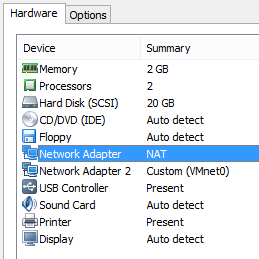
I had two network interface on VMware as below. One was made for NAT and other is for bridged. So I just wonder which one is eth0 or eth1 in Linux.

Image


First, find MAC address of VMware in a *.vmx file.

C:\VMImage>findstr /C:”.generatedAddress ” *.vmx
SecurityOnion.vmx:ethernet0.generatedAddress = “00:0c:29:1b:48:4d
SecurityOnion.vmx:ethernet1.generatedAddress = “00:0C:29:1B:48:57


Secondly, find MAC address of Network Interfaces.

root@sensor:~# ifconfig | grep HWaddr
eth0 Link encap:Ethernet HWaddr 00:0c:29:1b:48:4d
eth1 Link encap:Ethernet HWaddr 00:0c:29:1b:48:57


In other way, you can check MAC address of Network Interfaces.

root@sensor:~# lspci | grep -i ethernet | awk {‘print $1’} | while read pciid; do echo $pciid $(cat /sys/bus/pci/devices/*$pciid/net/*/address) $(cat /sys/bus/pci/devices/*$pciid/net/*/uevent); done
02:01.0 00:0c:29:1b:48:4d INTERFACE=eth0 IFINDEX=2
02:05.0 00:0c:29:1b:48:57 INTERFACE=eth1 IFINDEX=3


And then you can compare both result. In my case eth0 is NAT Network Interface and eth1 is VMnet0 Network Interface.